Skip to content

private voice agent · apple silicon mac

a voice assistant that sees your Mac.

Hold ctrl+option, ask about the screen in front of you, and Pace can answer or take an approved action. Voice, screen understanding, and planning stay local by default. No account required.
Free with Apple Foundation Models on macOS 26 · bundled local models are $29 once.
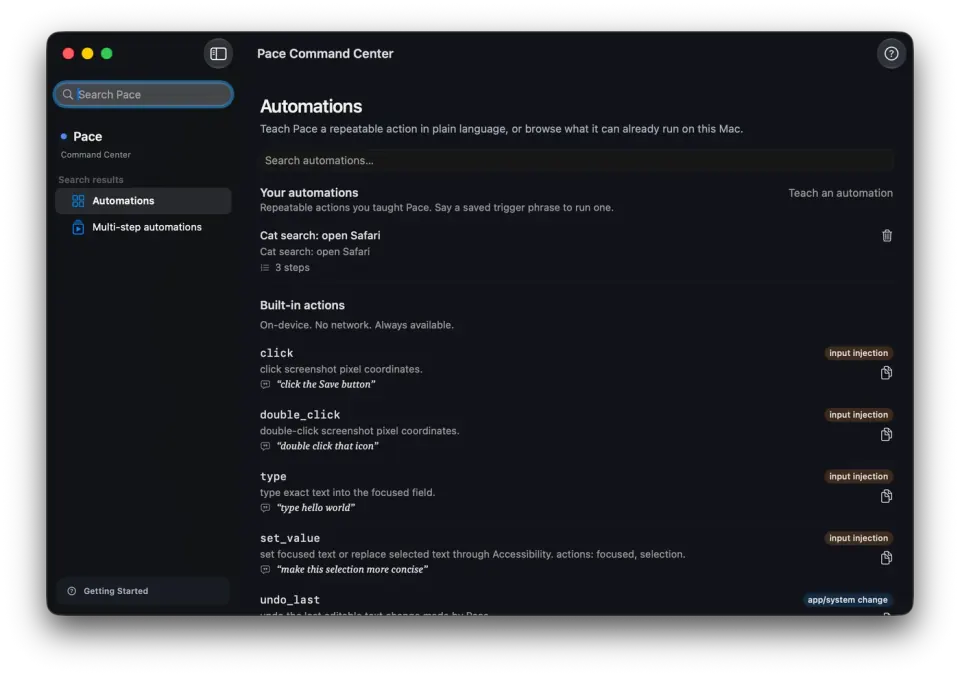
Pace Command Center showing a taught automation and the built-in local action list
Current development capture. The public 0.3.19 preview may differ; it is ad-hoc signed and not notarized.

the on-device part

in local mode, Pace ships nothing.

Your voice and screen are processed on your Apple Silicon. Conversation memory, journals, flows, and taught skills are ordinary local files under ~/Library/Application Support/Pace/. Downloads and update checks are reported separately.

what it does

voice, screen, approved actions.

Ask about what is on your screen. Pace merges a local vision model, Apple Vision OCR, and the macOS Accessibility tree into one element map for the planner.

listens
Hold ctrl+option, say something, let go. Always listening is an explicit opt-in in Settings.
clicks
“Click submit,” “snap this window left,” “add this to my calendar.” Pace works through Accessibility, with approval before actions.
teaches
Pace draws on your screen, points at the next thing to click, and advances when you actually click the right thing.

automation

repeat the work. keep the intent.

Record a flow to replay clicks and keystrokes. Install a pre-built recipe by voice. Teach a skill in plain language: Pace re-reads your screen and re-plans each run instead of blindly repeating clicks. Skills are ordinary markdown files you own.

meeting notes

without uploading the meeting.

Pace records your mic and the other side’s audio as separate tracks. Transcription runs on your Mac. A privacy-pinned local model writes the summary, action items, and decisions, even when you use a cloud planner elsewhere. Recordings and notes follow your retention window — 30 days by default.

reach

a bigger brain only when you say so.

The planner runs on your Mac by default. Settings → Planner lets you choose a consented Codex or Claude CLI, or a bring-your-own-key API. An off-device turn tints the capsule amber and writes to the local audit log. External integrations are your choice, off by default.

trust

an agent that touches your Mac has to be reversible.

Reversible changes leave a 5-second undo banner. Replay the same spoken answer for 30 seconds without running the planner again. If a click misses, Pace says so. The in-app Privacy dashboard measures bytes from the audit log: 0 bytes in local inference, then how much and to whom when a cloud tier you enabled runs.

voice and screen and actions.

Pace starts with voice, current-screen context, and visible computer actions. Read the source-linked field comparison to see where the other Mac assistants fit and where Pace is behind.

try it free. $29 once for the local stack.

The free preview uses Apple Foundation Models on macOS 26. The one-time purchase covers the current release and bundled local models. Payment, delivery, support, included updates, and any refund terms are confirmed before payment through the manual email path.

Apple Silicon only. The public preview is ad-hoc signed and not notarized; see the download page for installation steps.

the questions people actually ask.

Does it really run with no network?
Yes, in local mode. Voice, screen reading, planning, and TTS run on your Mac. The download_file tool fetches a URL only when you ask. Downloads and update checks are separate; an opt-in off-device planner turns the capsule amber and writes an audit entry. The in-app Privacy dashboard shows the exact byte count by surface.
Where do my meeting recordings go?
`~/Library/Application Support/Pace/meetings/` — two WAV files per meeting (your mic, their audio) plus the notes. Transcription and note-writing both happen on your Mac, and the notes model is pinned local: it can't use a cloud tier even if you've enabled one elsewhere in Pace. Everything auto-deletes after the retention window in Settings — 30 days by default. Want it gone sooner? Delete the folder. They're ordinary files.
How much disk and RAM are we talking?
The .app is about 50 megabytes. The in-process model — Qwen3-4B-Instruct-2507 in bf16, one toggle in Settings → Models — is ~8 gigabytes, downloaded once into your HuggingFace cache. With the vision model and transcription also loaded, peak RAM is ~14 GB. If your Mac has 16 GB, swap to the 4-bit variant in Settings → Models; that runs comfortably in ~6 GB.
What Macs?
The current 0.3.19 preview requires macOS 26 on an Apple Silicon Mac. Intel Macs aren't supported and there's no plan to add them — MLX is Metal-backed, and the on-device story is the product boundary. The shipped archive's Info.plist is the source of truth for this requirement.
iPhone? Windows?
No, and not on the roadmap. Pace is a Mac product. The Apple Silicon stack is what makes "voice + screen + actions, on-device, $29 once" possible at all. Spreading it across three operating systems would mean rebuilding the assumptions and raising the price.
What happens when you ship your own model?
There is no promised delivery date or future price today. The current manual purchase covers the current release and bundled local models; included updates are confirmed before payment. Sparkle can deliver app updates, but its presence is not a commercial promise.
Do I need LM Studio installed?
No. The bundled MLX path covers planning, vision, embeddings, and TTS in-process. LM Studio is still supported as the power-user option if you'd rather run the larger Qwen3-30B model, but it's not required for a fresh install to be useful.
How are purchase terms handled?
The current checkout is a manual email path. Payment, delivery, support, included updates, and any refund terms are confirmed before payment. The current release has no in-app licence activation or deactivation system.
What if I don't like the voice?
Settings → Voice picks any Apple Premium voice on your Mac, or the bundled Qwen3 TTS, or the Kokoro sidecar if you want the higher-quality option. You're not locked into one synthesiser.
What's Learning mode?
You point Pace at an app you don't know — Figma, Cursor, Logic Pro, an internal admin tool — and ask it to walk you through something. Pace draws on your screen, says "click here next," and when you actually click, it advances to the next step automatically. The verification loop is the new part: Pace watches your click events and only moves forward when you did the right thing.
Can I leave it always-on?
Yes, as an explicit opt-in. Enable Always listening in Settings and Pace opens a bounded listening window after its wake phrase. It is off by default; push-to-talk (ctrl+option) remains the clearest way to control when Pace can hear you.
Can it tell me what I did today?
Yes, from passive local journals. Watch mode logs when your screen meaningfully changes; a separate app-usage journal tracks which apps had focus and for how long, using notifications macOS hands out without any extra permission. Research turns get their own history. Ask "what did I do today?" or "what did I research about X?" and Pace answers from those journals — all on disk, 7-day retention for the screen/app logs, per-source enable and clear in Settings. In local mode, nothing is uploaded.
Can I trigger it from Raycast or Shortcuts?
Yes. Pace registers `pace://` deeplinks — `pace://listen`, `pace://chat?text=...`, `pace://watch?enabled=true`, and `pace://panel` — plus App Intents for Siri, Shortcuts, and Spotlight. Wire a Raycast script or a Shortcut to any of them. A deeplink runs the same intent and approval pipeline your own voice would, so it can't do anything you couldn't do yourself.
What happens if it clicks the wrong thing?
Every change Pace can reverse leaves a 5-second undo banner next to the cursor — tap it and it rolls back. If a click misses entirely, Pace says so in plain language rather than pretending it worked. And there's a 30-second replay button that speaks the exact same answer back without re-running the planner, in case you missed it.

field guides

understand the local stack.